Country or region and language

    Choose your country or region and your language.

    Suggested for you

      All countries and regions

        Choose your character

        It shows in the top bar and on your profile. Change it any time.

        Excel test for a job interview: what to expect and how to practice

        Employers test Excel either with a short quiz or with tasks in a workbook: lookups, conditional totals, cleaning text and dates, PivotTables and charts. Practice the task version free in our Excel skills test, which runs in a working spreadsheet and gives your level, then take a timed mock.

        Checked 20 November 2026

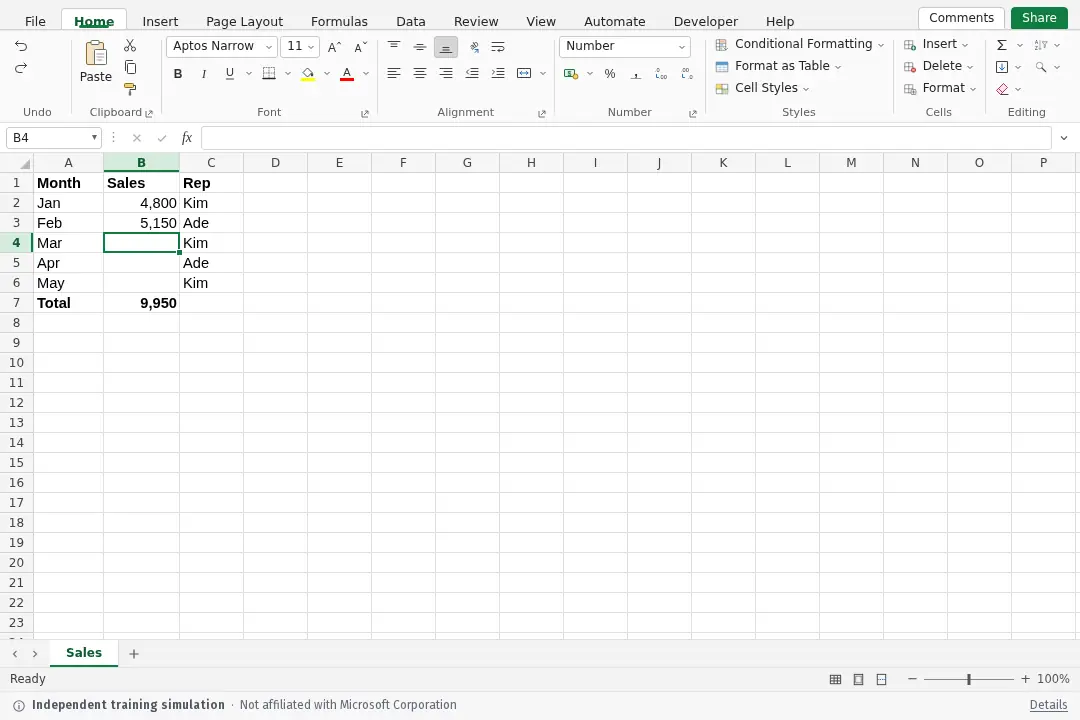
        The practice spreadsheet with the ribbon and formula bar, where every test and interview task is checked.
        The practice spreadsheet with the ribbon and formula bar, where every test and interview task is checked.

        Four sample tasks with answers

        The companies, products and amounts are fictional. These are original practice tasks, not questions from any employer’s test.

        1. Look up a price, even when the code is missing

        A price list sits in a table called Prices with the columns Code and Price. Return the price for the code in A2, and show “Not found” when it isn’t there.

        Answer: =XLOOKUP(A2, Prices[Code], Prices[Price], "Not found"). In older Excel, =IFERROR(VLOOKUP(A2, Prices, 2, FALSE), "Not found") does the same. The FALSE matters: without it, VLOOKUP looks for an approximate match and can return the wrong price. Practice it in the XLOOKUP lesson.

        2. Total one region for one month

        Total the Amount column for the North region in March 2026.

        Answer: =SUMIFS(Sales[Amount], Sales[Region], "North", Sales[Date], ">="&DATE(2026,3,1), Sales[Date], "<"&DATE(2026,4,1)). Two date conditions keep the whole month, including 31 March, without typing a last day. See SUMIFS and COUNTIFS.

        3. A column that adds up to zero

        A column of amounts imported from another system shows numbers, but SUM returns 0. What happened?

        Answer: The numbers are stored as text, often left-aligned with a green triangle. Check one with =ISNUMBER(C2), then convert the column with Data, Text to Columns, or with =VALUE(C2) in a helper column. Interviewers like this one because the total looks plausible until you check it.

        4. Orders by month and region

        Count orders by month, with one column per region.

        Answer: Insert a PivotTable from the order table. Put the order date in Rows and group it by Months, Region in Columns and Order ID in Values set to Count. Start with PivotTable basics.

        How to practice before the interview

        1. Take the free Excel skills test to find your level and the lessons to review.
        2. Work through the interview sets: essential spreadsheet tasks, Excel interview questions and advanced spreadsheet reasoning.
        3. Finish with a timed mock, such as core skills in MO-200 style.

        For the spoken part of an interview, practice explaining your answers in the Excel Interview Hub.

        ChatGPT teaches you. The Work Gym lets you practice.

        The Work Gym is independent and not affiliated with Microsoft. Excel is a trademark of the Microsoft group of companies.

        Where The Work Gym falls short

        • Our spreadsheet works like Excel but is not Microsoft Excel. A test on the employer's own computer may look slightly different, and a few rarely tested features are missing.
        • We don't reproduce any employer's or test company's questions. The tasks are original and test the same skills.
        • The free skills test and the first unit need no account; the interview sets and mock exams are part of a plan.

        Common questions

        What is on an Excel test for a job interview?

        Most tests ask you to look up values, total by conditions, fix data that won't add up, summarize a list with a PivotTable and build a chart. Analyst roles add INDEX and MATCH or XLOOKUP, SUMIFS, dates and sometimes a short model. Some employers use a multiple-choice quiz instead of a workbook.

        How do I pass an Excel assessment test?

        Practice the tasks in a spreadsheet, under a time limit, and check each result: a formula that returns a number may still return the wrong one. Learn the shortcuts for moving and selecting, since tests are timed.

        Is there a free Excel test online?

        Yes. The Work Gym's Excel skills test is free and needs no account. It uses real exercises from the course, checks each one as you finish and ends with your level and the lesson to start at.

        Should I practice on Windows or Mac?

        Either works for the formulas. Shortcuts differ, so if the test is on Windows, practice the Windows ones. The course's keyboard lessons show both.

        Sources

        Your Work Gym account

        Save your progress and pick up on another device. Your browser's progress comes with you.

        New accounts get 12 hours of full access: every course, unit, project and exam. The clock starts when you open your first lesson.

        Plan your practice from a job ad or syllabus

        Have a referral code?

        or

        You can keep practicing without an account.

        Help and feedback

        Ask a question, tell us what is not working, or share an idea. We reply by email.

        What is it about?

        We use it only to reply to you.